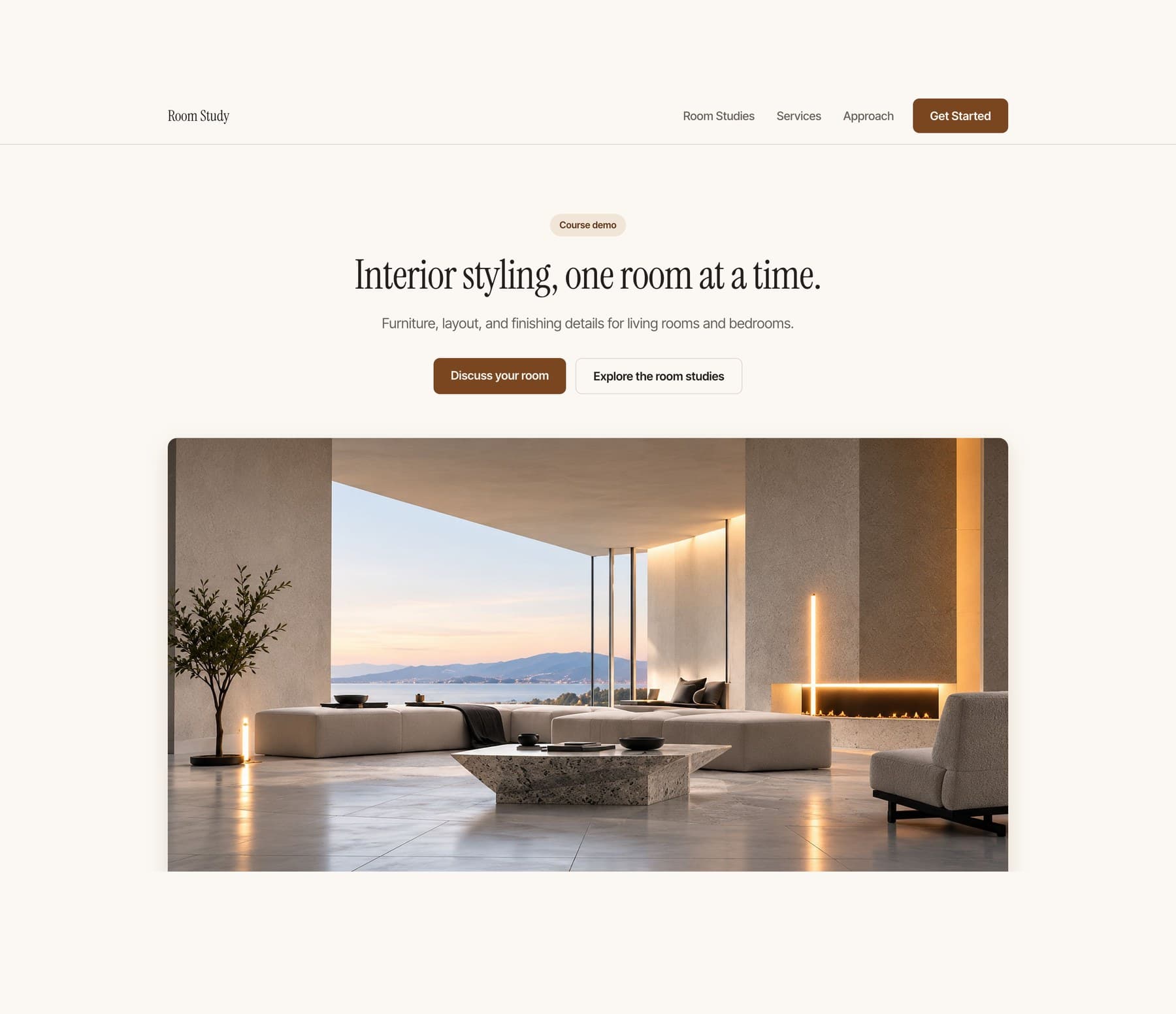
The Room Study website in its editorial treatment: a cream one page site headlined Interior styling, one room at a time, beside two warm photographs of a styled living room at dusk
Go further with your website
5 modules15 lessons

AdvancedWebsite Design

Branding, motion, and a multi-page website.

Coming soonPlanned launch price: $49.95

Not recorded yet. There is no release date, and nothing on this page is a preview of finished material.

01

What this course is

Follow Arian as he develops a stronger visual identity, adds deliberate motion, and expands a one-page website into a connected three-page site.

See the decisions, the instructions to Claude, and the refinements. Then apply the process to your own project.

02

Format

Guided demonstrations, practical exercises, and a few reusable prompts where they help.

This is a workshop rather than a prompt pack. Most lessons open on the work, not on something to copy.

03

Starting point

Bring the website you made in the beginner course, or an existing working site you are comfortable editing with Claude.

04

What is included

Design direction, three motion studies, a three-page build, and the checks needed before publishing.

Requirements

Basic comfort opening, editing, and previewing your website with Claude.

Additional tool and hosting costs, if any, will be listed before sale. No paid Brand Kit is required.

For booking or inquiries, you need an account with the service you choose. Use an existing service or the demonstrated setup. Provider pricing and limits are separate from the course.

02 · 5 modules · 15 lessons

Inside the course

The outline is here. The lessons are not available yet.

  1. Overhead editorial photograph of a laptop and notebook in a carefully arranged workspaceModule illustration
    Module 01

    Develop the visual identity

    Read the finished site honestly, make the visual system deliberate, and add one signature element.

    1. 01.01Read the website before changing it

      See the finished beginner site and learn to tell what is already working from what is genuinely inconsistent.

    2. 01.02Make the visual system more deliberate

      Refine typography, spacing, image scale, captions and colour relationships so a few connected decisions carry the whole page.

    3. 01.03Create one signature element

      Make one restrained brand element and learn where to use it, where not to, and when removing it is better.

  2. Overhead editorial photograph of a laptop and notebook in a carefully arranged workspaceModule illustration
    Module 02

    Choose how the website moves

    Compare three motion approaches on your own content, plan one sequence, and dial it in visually.

    1. 02.01Compare three motion approaches

      See quiet, editorial and immersive treatments of the same brand, content and images, and learn how motion changes attention and reading order.

    2. 02.02Plan the sequence before building it

      Give the chosen interaction a start, a middle and an end, and decide what moves, what stays still and what stays readable.

    3. 02.03Adjust it visually

      Use a small control panel beside the study to set duration, distance, delay and on or off, instead of guessing in words.

  3. Overhead editorial photograph of a laptop and notebook in a carefully arranged workspaceModule illustration
    Module 03

    Apply and refine the interactions

    Put the chosen sequence into the real site, finish the controls, and make every effect optional.

    1. 03.01Apply the selected scroll sequence

      Add one focused interaction to the real site while preserving content, navigation and the existing layout.

    2. 03.02Finish the buttons and navigation

      Build one consistent family of button, link and navigation states that works without hover.

    3. 03.03Make motion optional

      Keep the content and the action intact when the animation is removed, on a phone and under reduced motion.

  4. Overhead editorial photograph of a laptop and notebook in a carefully arranged workspaceModule illustration
    Module 04

    Expand into three pages

    Give each page a job, make them feel like one site, and build the project story.

    1. 04.01Give each page a job

      Decide when content deserves its own page, and stop the same text repeating across all three.

    2. 04.02Make the pages feel connected

      Build the shared header, footer, navigation, type and controls that keep a site consistent once it is no longer one page.

    3. 04.03Build the project story

      Tell one room concept through image order, pacing, detail crops, captions and a closing action.

  5. Overhead editorial photograph of a laptop and notebook in a carefully arranged workspaceModule illustration
    Module 05

    Finish and verify

    Judge whether the changes helped, test the whole experience, then publish and inspect the live site.

    1. 05.01Run the final design critique

      Put the beginner result beside the advanced one and learn what to remove when several effects compete.

    2. 05.02Test the whole experience

      Check navigation, loading, keyboard use, mobile and the motion alternatives across all three pages.

    3. 05.03Publish and inspect the live site

      Publish all three pages and check the public website rather than trusting a deploy message.

Selected work

Apps and websites I've designed and built.

05 · Courses

Start here.
Keep going.

The finished Room Study website, the reference build for this course: a cream one page site headlined Interior styling, one room at a time, above a wide photograph of a styled living room at dusk
01Start here
Planned launch price: $9.95

Build Your Website in a Day

Start with an empty project and finish with a polished one-page website you can open on your phone and send to other people. No coding experience required.

Coming soonView course
The Room Study website in its editorial treatment: a cream one page site headlined Interior styling, one room at a time, beside two warm photographs of a styled living room at dusk
02Go further with your website
Planned launch price: $49.95

Advanced Website Design

Follow Arian as he develops a stronger visual identity, adds deliberate motion, and expands a one-page website into a connected three-page site.

Coming soonView course
A creative working at a laptop against a bright orange panel
03Course 1 · Beginner
Planned launch price: $19

Build Your First App

Build a personal habit app with a checklist, a focus timer, and your own look. Add it to your phone home screen.

Coming soonView course
Overhead view of a minimal desk with a laptop, notebook, and geometric shadows
04Course 2 · Design and independent building
Planned launch price: $99

Design and Build Your Own App

Move beyond copied prompts. Learn to scope your idea, direct AI, and build an app with a consistent design.

Includes course 1
Coming soonView course
A figure holding a laptop between cream and orange architectural panels
05Course 3 · Native iPhone apps
Planned launch price: $199

Build and Publish Your iPhone App

Build a native iPhone app, test it, add useful Apple capabilities, and prepare your App Store submission.

Includes courses 1 and 2
Coming soonView course
A silhouetted creative at a laptop against cream and vivid orange architectural panels
06Studio track · Solo founders
Planned launch price: $95

Run Your Studio With AI

Build a small operating system that helps AI remember the work, report clearly, hand off cleanly, and run one recurring job without you.

Coming soonView course

06

Get the coursewhen it opens.

Choose the course updates you want. No account is needed.
18+ only
07 · FAQ
Will the booking or contact button actually work?

Yes. You connect the main action to an existing booking or inquiry service you control and test it from the visitor side and your own account. No custom backend is required.

Do I need to know how to code?

No previous coding experience is required for course 1. You will still learn how to describe a change, inspect what happened, test it and recover when it goes wrong.
Can I use a Windows computer?

Yes, for the tested course-1 and course-2 workflows. Course 3 uses a compatible Mac and Xcode.
Can I build using only my phone?

Not with the workflow taught here. Use a supported computer to build and your phone to test the result.

Will my first app be in the App Store?

No. Course 1 creates a home-screen web app. Native iPhone development and submission are covered in course 3.


Can I build a different idea?

Course 1 uses one small project so the instructions stay clear. Course 2 teaches you to adapt the process to your own small app. It is not a promise that every possible app fits the same scope.

Are the tools included in the price?

The listed teaching files and course tools are included. Third-party software, hosting upgrades, hardware and developer memberships are separate. Check the requirements before purchase.

Can I start with course 2 or 3?

Yes, once they are released. Higher packages include the earlier courses, so you can fill any gaps without buying the same material twice.

Is there live teaching?

The courses are prerecorded. Questions and project feedback happen in the community. No recurring live session or guaranteed personal debugging service is included.

Can I reuse the included project?

You can adapt the teaching project according to its included license. Your purchase does not include the production source of breathe or unrestricted resale of course materials and third-party assets.

Does the app save my data?

The first teaching app saves ordinary task data locally. It is not cloud sync, and clearing browser data can remove it. You will learn the limits and how later recovery options work.